> ## Documentation Index
> Fetch the complete documentation index at: https://docs.apten.ai/llms.txt
> Use this file to discover all available pages before exploring further.
# Runs & Troubleshooting
> Inspect automation run history, understand run statuses, and resolve failed steps.
## Overview
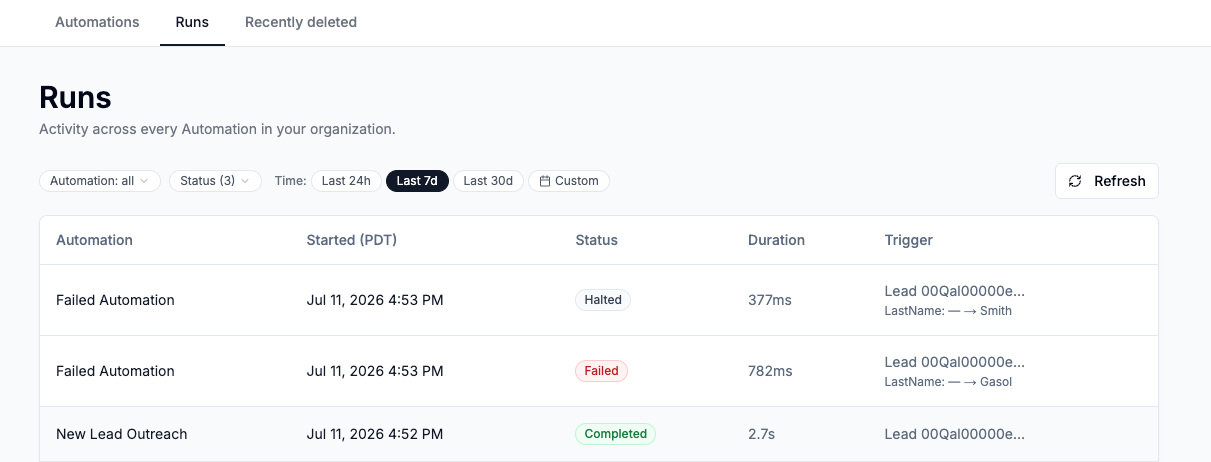
Every time a trigger fires, Apten records a **run** — one execution of one automation for one CRM record. The **Runs** tab shows activity across every automation in your organization, with per-step detail for each run.
Run history is retained for **90 days**, including for deleted automations.
 ## The Runs Page
Open **Automations → Runs**, or use **View Runs** in an automation's **⋯** menu to jump there pre-filtered to that automation.
Filters:
* **Automation** — one, several, or all automations
* **Status** — by default **Completed**, **Failed**, and **Halted** are shown; add **Running** and **Pending** to see in-flight runs
* **Time** — **Last 24h**, **Last 7d** (default), **Last 30d**, or a custom date range
Each row shows the automation, start time, status, duration, and the trigger — the CRM object and record that fired, including the field change for Field updated triggers (for example `Status: Open → Qualified`).
### Run statuses
| Status | Meaning |
| ------------- | ------------------------------------------------------------------------------------------------------------------------------------------ |
| **Completed** | Every step that should have run succeeded. |
| **Failed** | At least one step failed. Other steps or branches may still have completed — open the run to see exactly where it stopped. |
| **Halted** | A [Filter or Branch](/automations/control-steps) stopped the run because conditions didn't match. This is expected behavior, not an error. |
| **Running** | The run is in progress. |
| **Pending** | The run is queued and will start shortly. |
## Run Details
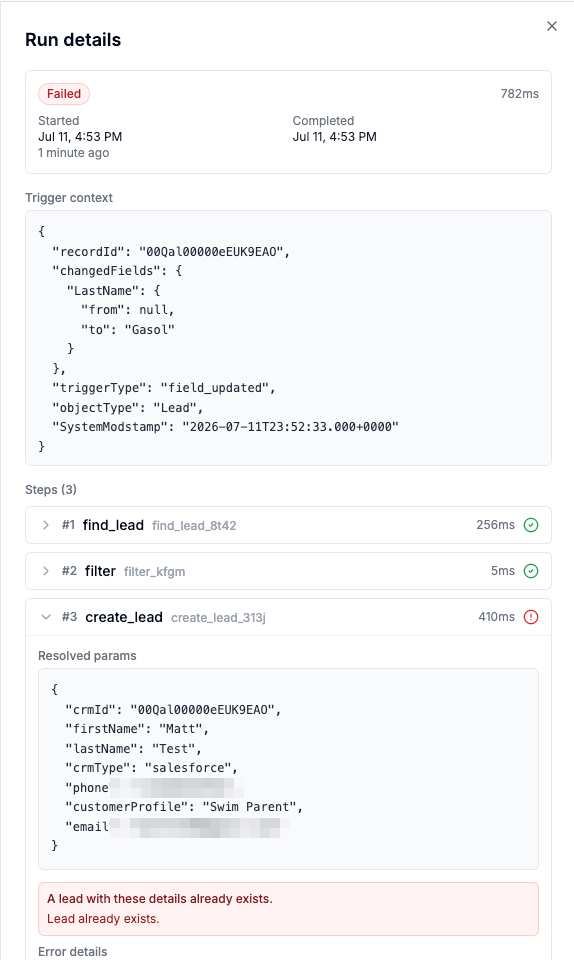
Click any run to open the **Run details** panel:
* **Trigger context** — the CRM record data that fired the run.
* **Steps** — each step with its status and duration. Expand a step to see its **Resolved params** (the exact inputs after template references were filled in) and **Output**, or the error if it failed.
* **Branch outcomes** — for runs with a Branch step, each branch shows how it ended: **Completed**, **Failed**, **Stopped by filter**, **Skipped — rules not met**, or **Fallback — not needed**.
* **View Run Config** — the full configuration of the automation *as it was when this run started*. Useful when you've edited the automation since.
## The Runs Page
Open **Automations → Runs**, or use **View Runs** in an automation's **⋯** menu to jump there pre-filtered to that automation.
Filters:
* **Automation** — one, several, or all automations
* **Status** — by default **Completed**, **Failed**, and **Halted** are shown; add **Running** and **Pending** to see in-flight runs
* **Time** — **Last 24h**, **Last 7d** (default), **Last 30d**, or a custom date range
Each row shows the automation, start time, status, duration, and the trigger — the CRM object and record that fired, including the field change for Field updated triggers (for example `Status: Open → Qualified`).
### Run statuses
| Status | Meaning |
| ------------- | ------------------------------------------------------------------------------------------------------------------------------------------ |
| **Completed** | Every step that should have run succeeded. |
| **Failed** | At least one step failed. Other steps or branches may still have completed — open the run to see exactly where it stopped. |
| **Halted** | A [Filter or Branch](/automations/control-steps) stopped the run because conditions didn't match. This is expected behavior, not an error. |
| **Running** | The run is in progress. |
| **Pending** | The run is queued and will start shortly. |
## Run Details
Click any run to open the **Run details** panel:
* **Trigger context** — the CRM record data that fired the run.
* **Steps** — each step with its status and duration. Expand a step to see its **Resolved params** (the exact inputs after template references were filled in) and **Output**, or the error if it failed.
* **Branch outcomes** — for runs with a Branch step, each branch shows how it ended: **Completed**, **Failed**, **Stopped by filter**, **Skipped — rules not met**, or **Fallback — not needed**.
* **View Run Config** — the full configuration of the automation *as it was when this run started*. Useful when you've edited the automation since.
 ## Troubleshooting Failed Steps
When a step fails, the run details show a plain-language error. The most common ones:
| Error | What it means | What to do |
| ---------------------------------------------------- | ----------------------------------------------------------------------------------------------------- | ------------------------------------------------------------------------------------------------------------------------ |
| The step's parameters didn't validate. | A required field is missing or malformed after template resolution. | Check the step's **Resolved params** to see what was actually submitted. |
| A template reference couldn't be resolved. | A `{{trigger.…}}` or `{{steps.…}}` reference points to a field that doesn't exist or wasn't produced. | Verify the referenced step ran and that the field name matches its outputs. |
| The lead this step tried to reach couldn't be found. | The **Apten lead ID** didn't match a lead. | Make sure the ID comes from a **Find Lead** / **Create Lead** output, and add a Filter on **Lead found?** before acting. |
| A lead with these details already exists. | **Create Lead** matched an existing lead by phone number. | Use **Find Lead** first, and only create when **Lead found?** is No. |
| The phone number is on the Do Not Contact list. | Outreach to this number is blocked. | Expected behavior — DNC numbers are never contacted. |
| The lead has unsubscribed. | The lead opted out of this channel. | Expected behavior — unsubscribed leads are never messaged. |
| Apten can't send messages to landlines. | The phone number is a landline. | Expected behavior for non-textable numbers. |
| Your account has hit its lead-creation quota. | Your organization reached its monthly lead limit. | Contact your Apten representative to adjust your plan. |
When a trigger matches a very large number of records at once — for example a CRM mass update touching thousands of rows — runs are queued and processed in batches. A large burst can take a while to drain; watch progress on the Runs page with the **Running** and **Pending** statuses enabled.
## Troubleshooting Failed Steps
When a step fails, the run details show a plain-language error. The most common ones:
| Error | What it means | What to do |
| ---------------------------------------------------- | ----------------------------------------------------------------------------------------------------- | ------------------------------------------------------------------------------------------------------------------------ |
| The step's parameters didn't validate. | A required field is missing or malformed after template resolution. | Check the step's **Resolved params** to see what was actually submitted. |
| A template reference couldn't be resolved. | A `{{trigger.…}}` or `{{steps.…}}` reference points to a field that doesn't exist or wasn't produced. | Verify the referenced step ran and that the field name matches its outputs. |
| The lead this step tried to reach couldn't be found. | The **Apten lead ID** didn't match a lead. | Make sure the ID comes from a **Find Lead** / **Create Lead** output, and add a Filter on **Lead found?** before acting. |
| A lead with these details already exists. | **Create Lead** matched an existing lead by phone number. | Use **Find Lead** first, and only create when **Lead found?** is No. |
| The phone number is on the Do Not Contact list. | Outreach to this number is blocked. | Expected behavior — DNC numbers are never contacted. |
| The lead has unsubscribed. | The lead opted out of this channel. | Expected behavior — unsubscribed leads are never messaged. |
| Apten can't send messages to landlines. | The phone number is a landline. | Expected behavior for non-textable numbers. |
| Your account has hit its lead-creation quota. | Your organization reached its monthly lead limit. | Contact your Apten representative to adjust your plan. |
When a trigger matches a very large number of records at once — for example a CRM mass update touching thousands of rows — runs are queued and processed in batches. A large burst can take a while to drain; watch progress on the Runs page with the **Running** and **Pending** statuses enabled.