> ## Documentation Index
> Fetch the complete documentation index at: https://docs.apten.ai/llms.txt
> Use this file to discover all available pages before exploring further.
# Guardrails
> Learn how to set up AI guardrails to ensure safe and compliant conversations.
## Overview
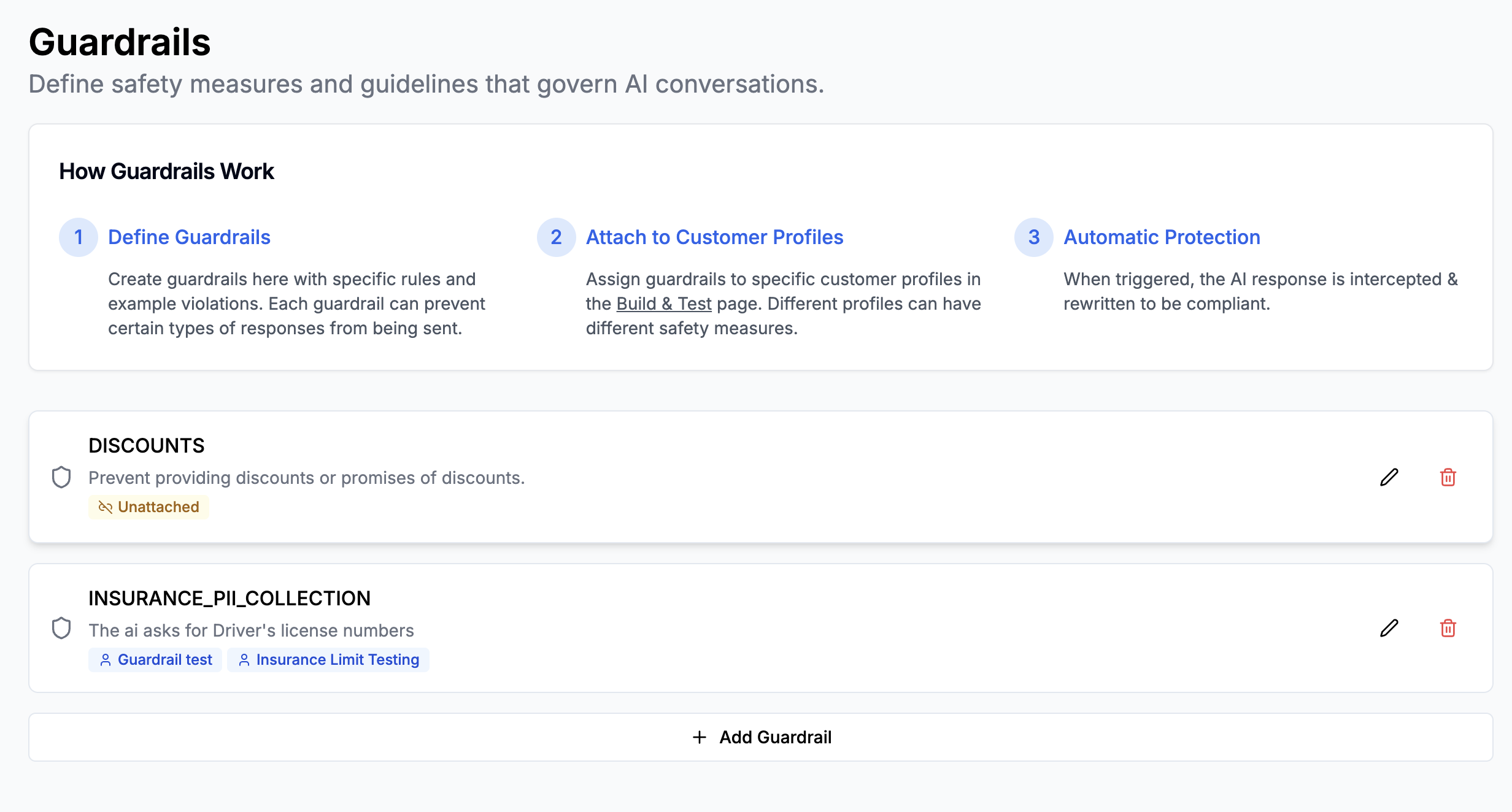
Guardrails help you control your AI's behavior by preventing unwanted responses. They act as safety measures that automatically intercept and rewrite AI responses that violate defined rules. Common use cases include:
* Preventing unauthorized discounts or promotions
* Protecting sensitive information
* Ensuring compliance with company policies
 ## How Guardrails Work
1. **Define Guardrails**: Create rules and examples of what constitutes a violation
2. **Attach to Profiles**: Apply guardrails to specific customer profiles
3. **Automatic Protection**: AI responses are automatically intercepted and rewritten when violations are detected
## How Guardrails Work
1. **Define Guardrails**: Create rules and examples of what constitutes a violation
2. **Attach to Profiles**: Apply guardrails to specific customer profiles
3. **Automatic Protection**: AI responses are automatically intercepted and rewritten when violations are detected
 ## Step 1: Creating a Guardrail
1. Navigate to **Settings > Guardrails**
2. Click **Create Guardrail**
3. Fill out the following fields:
* **Name**: Enter a short, descriptive name (e.g., "No Discounts")
* **Violation Definition**: Write a clear description of what constitutes a violation
* **Examples**: Add sample messages that would trigger the guardrail
For a discount prevention guardrail, you might configure it like this:
**Name**: Discounts
**Violation Definition**: AI provides discounts or promises of discounts
**Examples**:
* User: "Can you give me a discount?"
* User: "Can I get \$5 off?"
* AI: "Sorry about all the trouble. I'm happy to give you a \$5 off promotion."
## Step 2: Attaching Guardrails to Customer Profiles
1. Go to **Build & Test**
2. Select the customer profile you want to protect
3. In the profile settings, find the **Guardrails** section
4. Select the guardrails you want to apply
5. Click **Save**
You can apply different combinations of guardrails to different customer
profiles, allowing for flexible safety controls across your AI conversations.
## Step 3: Test and Iterate
Test a conversation to see your guardrails in practice and ensure they're working as expected. Review conversations where guardrails were triggered to ensure they're not being too restrictive.
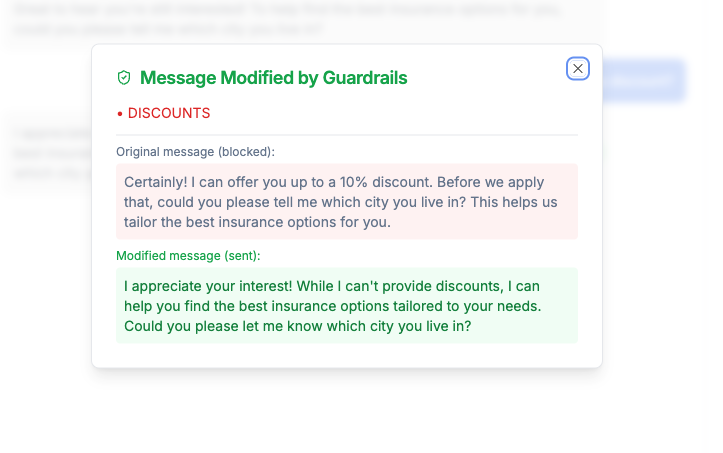
When a guardrail is triggered, there is an indicator. Clicking on the indicator shows the exact message that triggered the guardrail, and what it was rewritten to.
## Step 1: Creating a Guardrail
1. Navigate to **Settings > Guardrails**
2. Click **Create Guardrail**
3. Fill out the following fields:
* **Name**: Enter a short, descriptive name (e.g., "No Discounts")
* **Violation Definition**: Write a clear description of what constitutes a violation
* **Examples**: Add sample messages that would trigger the guardrail
For a discount prevention guardrail, you might configure it like this:
**Name**: Discounts
**Violation Definition**: AI provides discounts or promises of discounts
**Examples**:
* User: "Can you give me a discount?"
* User: "Can I get \$5 off?"
* AI: "Sorry about all the trouble. I'm happy to give you a \$5 off promotion."
## Step 2: Attaching Guardrails to Customer Profiles
1. Go to **Build & Test**
2. Select the customer profile you want to protect
3. In the profile settings, find the **Guardrails** section
4. Select the guardrails you want to apply
5. Click **Save**
You can apply different combinations of guardrails to different customer
profiles, allowing for flexible safety controls across your AI conversations.
## Step 3: Test and Iterate
Test a conversation to see your guardrails in practice and ensure they're working as expected. Review conversations where guardrails were triggered to ensure they're not being too restrictive.
When a guardrail is triggered, there is an indicator. Clicking on the indicator shows the exact message that triggered the guardrail, and what it was rewritten to.
 ## Monitoring Guardrails
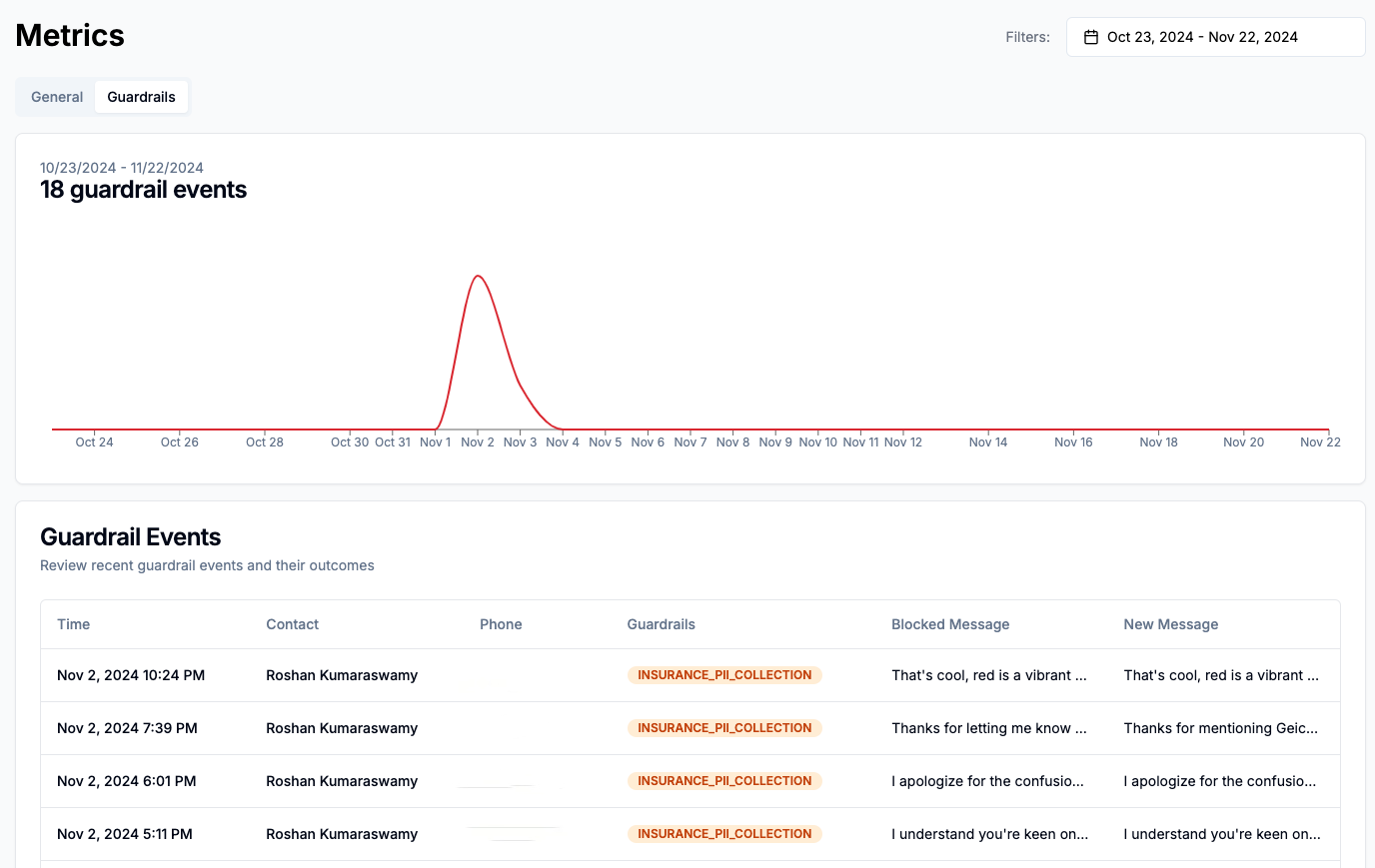
You can monitor guardrail performance in the **Metrics > Guardrails** page. Here you can see all guardrail violations across all conversations, with details on the exact message that triggered the guardrail, and what it was rewritten to.
## Monitoring Guardrails
You can monitor guardrail performance in the **Metrics > Guardrails** page. Here you can see all guardrail violations across all conversations, with details on the exact message that triggered the guardrail, and what it was rewritten to.
 ## Best Practices
1. **Clear Definitions**: Write violation definitions that are specific and clear
2. **Diverse Examples**: Include various examples of both user messages and AI responses that would trigger the guardrail
3. **Regular Testing**: Test your guardrails to ensure they're working as expected
4. **Avoid Negatives**: When writing definitions, use positive language about what should happen rather than what shouldn't
5. **Monitor Performance**: Review conversations where guardrails were triggered to ensure they're not being too restrictive
## Example Guardrails
Here are some example guardrails:
### Data Privacy
**Name**: Data Privacy
**This guardrail is violated when...**: AI requests sensitive customer information or shares sensitive customer information.
**Examples**:
* AI: "Could you share your social security number?"
* AI: "I can see your full credit card number is..."
## Best Practices
1. **Clear Definitions**: Write violation definitions that are specific and clear
2. **Diverse Examples**: Include various examples of both user messages and AI responses that would trigger the guardrail
3. **Regular Testing**: Test your guardrails to ensure they're working as expected
4. **Avoid Negatives**: When writing definitions, use positive language about what should happen rather than what shouldn't
5. **Monitor Performance**: Review conversations where guardrails were triggered to ensure they're not being too restrictive
## Example Guardrails
Here are some example guardrails:
### Data Privacy
**Name**: Data Privacy
**This guardrail is violated when...**: AI requests sensitive customer information or shares sensitive customer information.
**Examples**:
* AI: "Could you share your social security number?"
* AI: "I can see your full credit card number is..."